Can I change the next order date?Updated 9 months ago
Postponing an upcoming delivery and editing the delivery interval
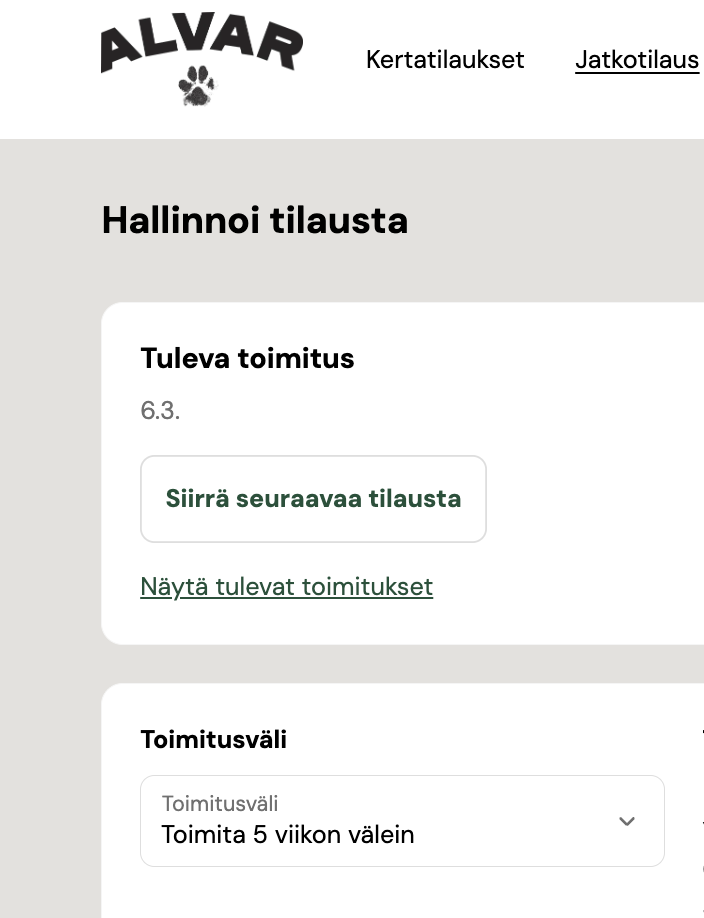
You can postpone an upcoming delivery up until the day before the scheduled delivery date. Orders are processed on the morning of the selected delivery date, and once an order has been charged, it can no longer be edited or postponed. You can always see your next delivery date on your customer pages.
You can move an upcoming delivery forward by clicking the “Siirrä seuraavaa tilausta” button. This link opens a calendar view where you can select the next order date.
You can edit the delivery interval under the “Toimitusväli” section.
Please note that changing the delivery interval does not affect the date of the next delivery—upcoming deliveries and the delivery interval are edited separately. 😊